Blog

Long-form notes on the tradeoffs that actually change how a live call feels.

Context Studio

Interview Context Studio and Toolkit: how context changes the answer

Last updated May 22, 2026

Most AI interview prep is weak for the same reason most rushed prep is weak: the answer has no memory. The model sees a question, guesses a reasonable generic answer, and leaves out the exact things that make a candidate credible - the CV, the job description, the strongest project, the missing ATS keywords, and the handful of topics the interview is actually likely to test.

Context Studio is the preparation layer built to fix that. It brings the profile, CV, cover letter, behavioral stories, job description, topic prep, answer style, ATS checks, and prompt builder into one flow before the live overlay ever starts. The goal is not to generate more text. The goal is to make every answer more anchored: what this role wants, what this candidate has done, and what the overlay should emphasize when pressure makes recall harder.

1. Profile Load the candidate
  • CV or resume
  • Cover letter
  • Behavioral stories
  • Role, level, and industry
2. Target Analyze the job
  • Company and role
  • Required skills
  • Responsibilities
  • Likely question areas
3. Toolkit Prepare materials
  • ATS CV check
  • JD match score
  • Tailored CV draft
  • Cover letter and intro
4. Overlay Use it live
  • Topic cues
  • Profile examples
  • Answer style
  • Prompt builder output

Here is a concrete example. Maya is applying for a Senior Backend Engineer role at a fintech company called FinPay. Her CV says she has five years of backend experience, strong PostgreSQL work, API ownership, a production migration, and one measurable win: a database project that reduced latency by 40%. The job description asks for payment reliability, PostgreSQL, Kafka, AWS, observability, and system design.

What Context Studio extracts before generating prep material.
Input Raw detail Prepared signal
Profile Backend engineer, APIs, PostgreSQL, cloud infrastructure, production debugging. Use the latency project and migration story whenever backend reliability comes up.
Job description Payment systems, Kafka, AWS, observability, high-scale backend services. Questions will likely probe idempotency, retries, event-driven workflows, and monitoring.
Gap CV does not clearly mention Kafka, observability, or payment reliability. Tailor the CV only where truthful, and prep answers that connect existing backend work to those areas.

That analysis drives the application toolkit. A normal ATS check asks whether the CV is readable by applicant tracking systems. A JD-specific ATS check asks the more useful question: does this CV match this role? In Maya's case, the original CV is readable but under-targeted.

Uploaded CV 72/100

Readable structure, strong PostgreSQL result, but weak role alignment for Kafka, AWS, observability, and payment reliability.

Generated CV 86/100

Clearer backend reliability summary, stronger keyword balance, and bullets rewritten around production impact.

Same experience, different framing after JD-aware CV generation.
Before After
Worked on backend services and improved performance. Improved backend API performance by optimizing PostgreSQL queries and service-level caching, reducing average request latency by 40% across high-traffic workflows.
Helped with migration work for internal services. Led a safe backend migration plan with rollout checkpoints, monitoring, and fallback steps to protect production reliability during the transition.

The same profile and job context can generate a tailored cover letter, a short spoken introduction, and a prompt bundle for another AI subscription. The important boundary is that application drafts stay tied to this session. The tailored CV and cover letter are not injected into live coaching prompts. The short introduction can be used live because it is directly useful for questions like "tell me about yourself."

CV context changes a different layer of the answer. Topic prep tells the model which angles to cover. CV context tells it which evidence belongs to this candidate. That is why the same "tell me about yourself" question sounds very different once the profile is loaded.

No CV Context Safe but forgettable intro
QUESTION
"Tell me about yourself."
BackendAPIsTeamwork
LIVE TRANSCRIPT
I am a backend engineer who enjoys building reliable systems...
NO PROFILE · CV OFF 0.9k / 50k
CV Loaded Specific proof from profile
QUESTION
"Tell me about yourself."
5 yearsPostgreSQL40% latency
LIVE TRANSCRIPT
I am a backend engineer with five years of experience in APIs and PostgreSQL-backed services...
PROFILE · CV ON 1.5k / 50k
Without CV context The answer is clean, but generic. It has no dates, no metric, no strongest project, and no reason to believe this candidate did the work.
With CV context The answer uses Maya's exact evidence: five years, PostgreSQL-backed APIs, safe migration work, and the 40% latency result.

The biggest difference shows up in the overlay. Without topic prep, the assistant can still answer the question, but it tends to answer like a smart generalist. With topic prep, the same question gets routed through the angles you already prepared: subtopics, coverage cues, prompt addendum, and the candidate stories that make the answer real.

Topic Prep Off Generic database answer
QUESTION
"How do you improve PostgreSQL performance?"
IndexesCachingQuery plans
LIVE TRANSCRIPT
I would look at slow queries, add indexes, and consider caching...
GENERIC · TOPIC PREP OFF 1.1k / 50k
Topic Prep On Prepared cues + profile story
QUESTION
"How do you improve PostgreSQL performance?"
Slow queriesIndex trade-off40% latency
LIVE TRANSCRIPT
I would first identify whether the bottleneck is query planning, locks, or access patterns...
PREPARED · TOPIC PREP ON 1.6k / 50k
Without topic prep The answer is directionally correct, but it sounds like any backend candidate could have said it.
With topic prep The overlay covers prepared cues: slow-query diagnosis, index write-cost trade-off, migration safety, and Maya's 40% latency result.

AI style sits on top of that context. A useful style instruction is not "sound smart." It is more operational: answer like a senior backend engineer, lead with the concise decision, then explain the trade-off, and use profile examples when they fit. With that instruction, the overlay stops sounding like a lecture and starts sounding like the candidate on a good day.

Copy Prompt Builder

The prompt builder copies a Markdown bundle the candidate can paste into another AI subscription, improve there, and bring back as a stronger custom instruction.

# Goal
Prepare me for a Senior Backend Engineer interview at FinPay.

# Candidate Profile
5 years backend engineering. APIs, PostgreSQL, cloud infrastructure, production debugging.

# Job Description Signals
Payment reliability, Kafka, AWS, observability, system design, high-scale backend services.

# Strongest Evidence
- Reduced PostgreSQL query latency by 40%
- Led a safe backend migration with no major downtime
- Built APIs used by multiple product teams

# Answer Style
Confident, concise, practical. Lead with the decision, explain trade-offs, then use one real example.

# Task
Create topic-specific answer guidance and practice prompts that use my profile and the job description.

This is the real value of the toolkit. It does not replace preparation. It makes preparation portable. The profile improves the application drafts. The job description sharpens the ATS score. Topic prep tells the overlay which angles matter. CV context gives the answer proof. Prompt style makes the delivery sound like the candidate instead of a generic model. When those pieces are connected, the generated answer is no longer just "correct." It is specific, defensible, and easier to say out loud.
Featured Post

Which model you should use

Last updated April 11, 2026

Live calls punish hesitation. You can have the right idea, the right wording, and the right instinct, and still sound weaker than you are if the answer arrives a beat too late. We optimize for time to first answer token before almost everything else because that first beat decides whether the assistant feels like calm support or dead weight. In practice, the experience of using a meeting assistant is shaped less by benchmark theater and more by whether the first useful sentence lands quickly enough to keep your own thinking rhythm intact when the room gets tense.

ViewFraming Auto stays at the top of our stack for that reason. It is the fastest path we have ever shipped - answers routinely land under 1.5 seconds, and in live sessions it most often feels ready to move at conversation speed, not demo speed. That difference matters when every pause sounds louder than it should. Gemini Flash 3.1 Lite stays close behind because it is still quick, scales well, and gives a very strong option when you bring your own key and want speed with a familiar ecosystem behind it. The difference is not that Gemini is weak. The difference is that ViewFraming Auto more often feels like the sharper tool when the cost of even a small delay is your own confidence.

ViewFraming Auto is not a single model with a fast name. It is a composite stack - we route across several of the fastest available models in parallel, applying caching and request-routing logic that selects the path most likely to respond first for the shape of question you just asked. A single fast model like Gemini Flash 3.1 Lite can only ever be as fast as that model's best case on that particular request. ViewFraming Auto's latency ceiling is lower because the routing layer picks the winner across multiple fast options in real time, and response caching means repeated context patterns do not add inference overhead on top of each other. That is why under 1.5 seconds is a ceiling for ViewFraming Auto, not a starting point.

The table below is the cleanest version of that opinion. It is not meant to pretend these models live in a sterile benchmark lab. It is meant to reflect what matters in a real live-call loop: how quickly the first answer appears, whether the stream keeps up, and whether the price feels justified once real pressure enters the conversation.

My short list for live call use, weighted toward responsiveness over lab-style score chasing.
Model Time to first token Tokens / sec Cost / price ratio
ViewFraming Auto Sub-second p95 latency, even under load. Our measurement on a technical question: avg 0.5 ~ 1.5s. Exceptionally fast. Throughput is rarely the bottleneck. Managed - no key required. Included in plan.
GPT-5.4 Nano OpenAI's fastest, lowest-cost GPT-5.4 model. Our measurement on a technical question: avg 0.8 ~ 2s. Fast. Comparable to the nano tier ceiling. $0.10 in / $0.40 out.
Gemini Flash 3.1 Lite 2.5x faster than Gemini 2.5 Flash. Our measurement on a technical question: avg 1 ~ 2.5s. +45% vs Gemini 2.5 Flash. $0.25 in / $1.50 out.

Because vendors publish different official speed metrics, this table uses the concrete numbers each company actually discloses instead of inventing a fake apples-to-apples benchmark. What matters to us is still the same question: which stack keeps the answer moving when the call is live.

Once the model decision is clear, the audio stack becomes the next bottleneck. The same composite principle that makes ViewFraming Auto fast for answer generation applies here too. Rather than routing everything through a single cloud STT provider, ViewFraming Auto Audio combines local on-device recognition with cloud providers, selecting the fastest available path per session. When the device can handle it locally, latency effectively disappears. When cloud gives better accuracy for the language or accent in the room, it routes there instead. No single provider can win that tradeoff on its own because each one only covers half of it.

Audio transcription stack comparison for live call use.
Provider Latency Languages Approach
ViewFraming Auto Audio Fastest path per session. Local inference when possible, cloud when needed. Auto-routed. Best provider selected per language. Hybrid local + cloud composite. Managed - no key required.
Deepgram Low word error rate on conversational English. Handles technical vocabulary and fast speakers well. English-focused. Cloud. Strong default for English calls.
ElevenLabs Targets under 150 ms latency. Realtime stack designed for live use. 90+ languages. Cloud. Best choice when multilingual quality matters.

Apple Speech is still worth keeping as a fallback. The local path is attractive and the privacy story is clean, but the dedicated cloud stacks feel stronger when meeting pressure exposes every weak transcription choice. ViewFraming Auto Audio already folds local inference into its routing, so if you are on a managed plan you get the best of both without configuring anything.

For people who do not want to manage keys, we run managed models on our side, but we try very hard to earn that convenience. The routing has been heavily tested, the prompt and timeout behavior have gone through repeated iteration, and we spend deep engineering work on the unglamorous details that make the product feel reliable instead of lucky. We care about answer quality, stability, and recovery behavior just as much as raw model speed, which is why we are comfortable offering higher rate limits while still keeping a generous per-session token budget in place. If that tradeoff matters to you, the privacy note and legal page are the right places to read the boundary clearly: requests go directly to your provider when you bring your own key, and managed setups carry their own privacy tradeoffs.

Bring your own key

Session Cost

Token budgets and what they actually cost

Last updated April 12, 2026

There are two ways to look at token usage in a session. The budget token is the hard ceiling you configure - the maximum number of tokens a single session is allowed to consume before the assistant stops. The costing token is just that same number expressed from the other side: what the provider actually charges you for. Same count, two different lenses. Setting a budget token limit means you already know your worst-case spend before the session starts.

We enforce a session cap on managed plans for two reasons. The first is predictability. A deep technical session with long transcript context can accumulate tokens faster than it feels like in the room. Without a ceiling, costs drift in ways that are hard to reason about after the fact. The second is fairness. Managed infrastructure is shared, and an uncapped session that runs unusually long puts pressure on rate limits that other sessions depend on. The cap keeps the system stable for everyone.

The ceiling we set is generous. After running several hundred real sessions across both technical and behavioral tracks - short loops, long loops, candidates who talk a lot, candidates who keep things tight - 3 million tokens covers every realistic scenario comfortably. You are not going to hit the wall in a normal meeting. The cap is there to protect against runaway usage, not to interrupt you mid-session.

To make that concrete, here is what 3 million tokens translates to at current provider rates for the two models we recommend most. The estimate uses a realistic session split of roughly half input, half output - system prompts, transcript context, and prior answers on the input side; generated coaching and answer drafts on the output side.

Estimated session cost at 3M token budget cap. Assumes ~1.5M input tokens and ~1.5M output tokens - a conservative ceiling well above what most sessions actually consume.
Model Input rate Output rate Est. cost at 3M cap
ViewFraming Auto Managed plan Managed plan Covered by session credit. No per-token billing. The 3M cap is still enforced per session.
GPT-5.4 Nano $0.10 / 1M tokens $0.40 / 1M tokens ~$0.75 worst case. Lowest cost per session of the BYOK options.
Gemini Flash 3.1 Lite $0.25 / 1M tokens $1.50 / 1M tokens ~$2.63 worst case. Higher output rate, still very affordable per session.

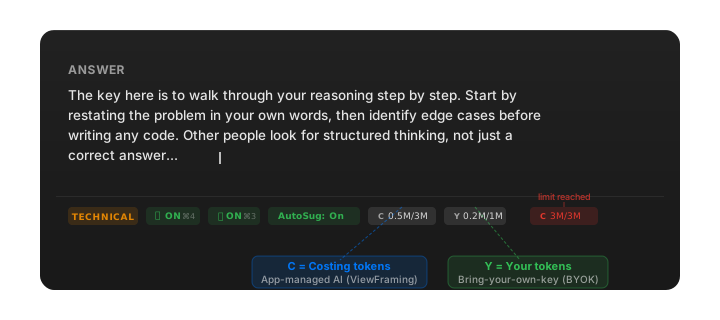
Inside the app, the status bar at the bottom of the overlay panel shows two small pills during every session so you can see where you stand at a glance.

Overlay status bar showing C 0.5M/3M for costing tokens and Y 0.2M/1M for your own BYOK tokens, with a red exhausted state example on the right

C is the costing token counter - it tracks usage on app-managed AI (ViewFraming). Y is your own token counter - it tracks usage when you bring your own provider key. Both show spent / limit in compact form (e.g. 0.5M/3M). When either pill turns red the session has hit its cap and responses pause.

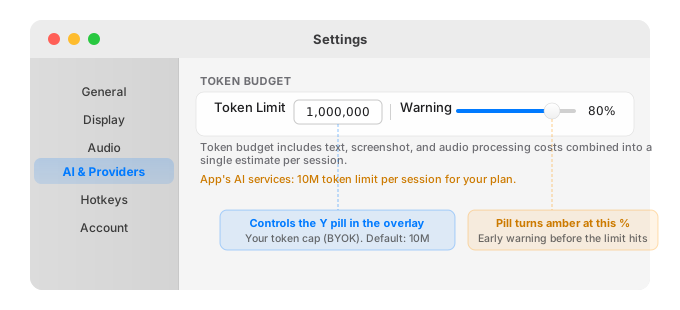
If you bring your own API key, you set the token budget yourself in Settings → AI & Providers → Token Budget. The Token Limit field is the number that maps to the Y pill in the overlay - that number feeds directly into your provider spend, so the cost table above is your ceiling. The Warning Threshold slider turns the Y pill amber before you hit the hard cap, giving you a heads-up mid-session.

Settings panel showing AI & Providers selected, with Token Budget section containing a Token Limit field set to 1,000,000 and a Warning Threshold slider at 80%

Free-tier keys from both providers have enough quota to run a lite session without touching paid credits. If you want higher rate limits and more headroom for back-to-back sessions, a pay-as-you-go key unlocks that, and the in-app budget limit keeps your monthly bill from drifting higher than you expect.

One important clarification: the token cap only applies to the live call overlay. Everything else - document review, follow-up drafting, pre-call prep, and post-call feedback - runs without a session cap. Those features are powered by the same fine-tuned models we have spent a lot of time optimising for quality, so use them as much as you need.

On managed plans we go further. The routing, prompt structure, and context-trimming logic have been through repeated iteration specifically to spend fewer tokens per useful answer. That means the effective cost per session is lower than the raw per-token rate suggests, rate limits are higher than what a standard free-tier key gets, and the whole thing stays behind the same 3M cap as a hard backstop. If you want to understand the privacy tradeoff that comes with managed routing versus your own key, the detail is in the legal page - the short version is that managed requests go through our infrastructure and your own-key requests go directly to your provider.

Practice Mode

AI meeting practice and progress tracking

Last updated April 14, 2026

Reading about high-stakes conversations is not the same as practicing them. The gap between knowing an answer and delivering it clearly under observation is a performance gap, not a knowledge gap - and the only way to close it is through repeated simulation with feedback. ViewFraming practice mode is built around that loop: you answer questions out loud, the AI evaluates your response against a structured rubric, and the overlay surfaces targeted feedback immediately after each answer while the session is still fresh.

When you start a practice session you configure the role type and conversation format - technical, behavioral, or system design. ViewFraming asks you questions in sequence. Your microphone captures your spoken answer. The transcript updates in real time as you speak, and when you finish the AI evaluates your response and shows the structured breakdown in the overlay panel before the next question loads. The loop is designed to feel close to the actual live-call rhythm - because the stress response you are training down only responds to simulation, not to reading.

The overlay during a practice session looks different from the live assistance mode. Instead of streaming a suggested answer, it shows structured feedback on the answer you just gave - organized into the three layers the AI coaches you toward.

Technical State management trade-off
QUESTION
"How would you handle state management in a large React application?"
ZustandRedux ToolkitContext API
LIVE TRANSCRIPT
I would start by separating local UI state from shared application state...
TECHNICAL · MIC ON · FEEDBACK ON 1.2k / 50k
⌘⇧A Submit Answer ⌘⇧N Next
Behavioral Conflict story structure
QUESTION
"Tell me about a time you had conflict with a teammate."
Conflict ResolutionOwnershipSTAR
LIVE TRANSCRIPT
I had a disagreement with a backend engineer about the launch scope...
BEHAVIORAL · MIC ON · FEEDBACK ON 1.0k / 50k
⌘⇧A Submit Answer ⌘⇧N Next
Keyword The compact chip that names the technique or competency your answer should lead with.
Detail The explanation layer: how the concept works, why it applies, and what trade-off matters.
Answer The full response structure, including the concrete example that turns theory into evidence.
Highlighting The active emphasis that shows which part of the framework ViewFraming wants you to notice.
Banner overlay The brief coaching note that appears when the AI detects a gap or correction opportunity.

The answer structure ViewFraming coaches toward has three distinct layers, shown as separate zones in the overlay. The keyword appears as a chip at the top - the core concept or technique your answer should be anchored in. Naming it immediately gives the caller a model to attach the rest of your answer to, and signals that you know which domain you are operating in. The detail layer explains what the keyword means, how it works, and why it applies to the question. The example layer grounds it - a concrete instance from your own experience, or a scenario that demonstrates applied knowledge rather than theory.

An answer that leads with keyword, develops the detail, and closes with an example is structurally complete. The other person can follow it, probe it, and ask follow-up questions on any layer. Most weak answers are missing one layer - usually either the keyword (too vague to anchor) or the example (too abstract to be credible). The overlay shows you exactly which layer your answer was weak on and gives you the specific language you could have used instead, so the correction is actionable, not just a score.

The banner overlay is the notification that appears the moment ViewFraming finishes processing your spoken answer. It slides in over the current screen - visible only to you, excluded from screen recording the same way the answer panel is. It shows a compact version of the feedback: whether your answer hit all three layers, what the keyword should have been if yours was unclear, and a one-line note on the example. The banner clears on your next input so the feedback loop stays fast without interrupting your flow into the next question.

Progress tracking shows patterns across sessions, not scores per individual answer. After several sessions you start to see which question types you consistently nail the keyword layer on, which ones you over-index on detail at the expense of example, and which formats need the most targeted repetition. Technical questions tend to surface weak examples - people who know the concept well often cannot produce a specific concrete use case on demand. Behavioral questions tend to surface weak keywords - the answer has a good story, but it does not open with the competency it is demonstrating.

Progress

30-day practice momentum Momentum and dynamic buckets are ready now. Weak themes unlock the next focused session.
Sessions12 Avg score8.1 Streak5d
Total sessions128 AI practice, 4 live
Recent average8.4last 5 scored sessions
Improvement+1.2vs previous block
Momentum 7d30dAll

Recent sessions are improving, but the pattern gap is concentrated in behavioral openings.

Topic Grouping questions + avg score
React state6q · 8.7
Conflict5q · 6.8
System design4q · 7.9
Dynamic Buckets weak themes over time
Examples too generic
Weak keyword open
Missing trade-off
Bucket Trends mini trend lines
Weak keyword openrising this week
Examples too genericimproving
Deeper Analysis root causes and mix
Recurring root causes Starts with story before competency
Practice coverage & mix
Next Best Practice Practice behavioral openings

Run a focused behavioral session where every answer starts with the competency label before the STAR story.

Example progress snapshot across conversation formats after 10 practice sessions.
Format Keyword Detail Example Pattern gap
Technical Strong Strong Vague Examples too generic — name a real project, not "in general you would..."
Behavioral Unclear Good story Good story Lead with the competency, not the narrative — open with the keyword first
System Design Strong Strong Missing No trade-off discussion — example layer needs a concrete constraint or decision

The most effective use of practice mode is targeted repetition on the format where your tracker shows a consistent gap. If behavioral questions always show a weak keyword layer, run three behavioral-only sessions focused explicitly on opening every answer with the competency label before telling the story. The framework stays the same across formats - keyword, detail, example - but the way each layer manifests shifts. Behavioral answers take a STAR-structured story as their example layer (Situation, Task, Action, Result). Technical answers take a specific project or implementation detail. System design takes a named trade-off or constraint you have actually reasoned through.

Once the framework is internalized through practice, the live overlay during a real live call changes function. You see the keyword chip appear and recognize the structure you would build yourself. The AI confirms the direction; you fill in the personal detail and example from your own experience. The overlay becomes a safety net for the moments when pressure collapses recall - not a script to read from. That is the point of the practice loop: to reach the state where you only need the net.

More notes coming soon

Have a topic you want covered? Let us know.